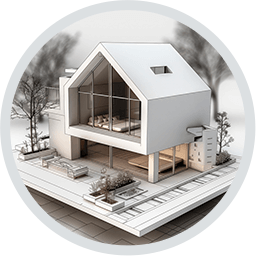
Ashampoo 3D CAD Architecture is a paid Windows CAD program for planning houses and other buildings. It supports new construction as well as renovation and redecoration. It produces floor plans, sections, elevations and 3D models from the same project. It targets home planners who want more than a simple design tool and users who need proper construction drawings. Ashampoo places it between its Home Design product and 3D CAD Professional. A free trial is available.
Planning a building in 2D and 3D
Work in Ashampoo 3D CAD Architecture starts with a step-by-step wizard that sets up the project. Users then draw walls, windows and doors on the floor plan. They can type in their dimensions numerically when the plan has to be exact. Users can view the model as a 2D plan, a 3D view or a cross-section at any time. Switching between them helps reveal missing parts and weak points before anything is built.
The interface can use classic toolbars or Office-style ribbons. Users can place a scanned floor plan saved as JPG or PNG in the project and trace it as a template. This turns a paper drawing into a 3D model.
Roofs, doors and windows
Roofs are among the harder parts of any house model, so the program provides input aids and wizards for them. The program supports several roof types, along with roof extensions, roof openings and dormers that users can copy and move.
Doors and windows come from a catalog. It includes US-style windows and doors with asymmetrical wall openings, such as sliding doors that run on a track. The program can number walls and windows automatically, which keeps references consistent between the drawing and any lists derived from it.
Terrain and outdoor areas
A plot element and a terrain wizard model the land around the building. Users can place retaining walls for the plot, the garden and the terrain. Sections and views can show heights relative to sea level, which matters when a site is not flat.
Electrical installation planning
An electrical planning assistant places outlets, switches and lights. It works from room types, either predefined or created by the user, and from templates. The assistant analyzes each room and suggests where the components should go.
The result sits on its own electrical layer, so users can show or hide it without affecting the architectural drawing. Users can move or rotate placed symbols and add custom symbols. The program generates a parts list of the installed components.
Solar panel layouts
Users can plan photovoltaic arrays on pitched or flat roofs. Pitched roof surfaces are prepared when the roof is set up, while flat-roof areas are selected during design. Users place an array in two clicks and can then space, rotate or realign it. The catalog includes current solar modules and preconfigured assemblies for balcony power systems.
Area calculation and lists
Ashampoo 3D CAD Architecture calculates living space, floor space and the areas of walls, ceilings and facades. Users can export facade area results and window position lists to PDF, RTF or Excel.
Users can also export placed 2D symbols as a structured list with quantities and logical names, in the same three formats. The list serves documentation and coordination with others working on the project.
Drawing output and elevations
The program can automatically apply dimensioning to 2D floor plans and top views. Elevation views use hidden-line processing that removes unwanted dividing lines between stacked wall elements. This lets exterior views print cleanly without manual cleanup. A separate wizard handles scale and plan layout when users prepare the drawing for a sheet.
Users can mirror 2D and 3D objects and symbols across any axis or around their own center point. This includes mirroring several selected items at once. This speeds up symmetrical layouts such as semi-detached houses or matching rooms.
Fire escape plans
A plugin turns existing floor plans into escape and rescue plans. It adds frames, signage symbols, legends and color-coded rooms, and a wizard sets the scale, layout and sheet. The signage comes from a 2D symbol catalog that also generates legends automatically. This lets Ashampoo 3D CAD Architecture produce a building’s evacuation drawing from the same model as its construction plans.
Object catalog and materials
The built-in catalog holds building components, ready-made groups such as garages, kitchen units and saunas, textures, materials and symbols. Users can scale newer 3D objects individually and give them their own materials and textures. Older grouped elements could only be used as a whole. Users can import additional models in SketchUp and Collada formats.
For surfaces, the program links to the mtextur material library. Users can download materials there as CAD and BIM textures and apply them to walls, floors and other parts of the model.





